Salesforce AI Demystified: How Einstein, Agentforce, and Built-In Tools Are Changing Workflows
Salesforce has been shaping the CRM world for over twenty years. Now it’s rewriting the playbook again, this time with artificial intelligence built right into the heart of the platform.
The impact of this intelligence-first approach is staggering. By April 2025, Salesforce’s AI-driven products were already pulling in more than \$900 million in annual recurring revenue. Industry analysts are predicting that AI-powered CRM spending will keep climbing sharply in the next few years. Based on what’s rolling out, they’re probably right.
The goal for Salesforce and AI isn’t on one-trick chatbots or a few “smart” reports. It’s on connecting every part of the customer experience: sales, service, marketing, and commerce, with clean data and intelligence that can actually take action.
Here’s everything business leaders should know.
Salesforce AI at a Glance: The Three-Layer Model
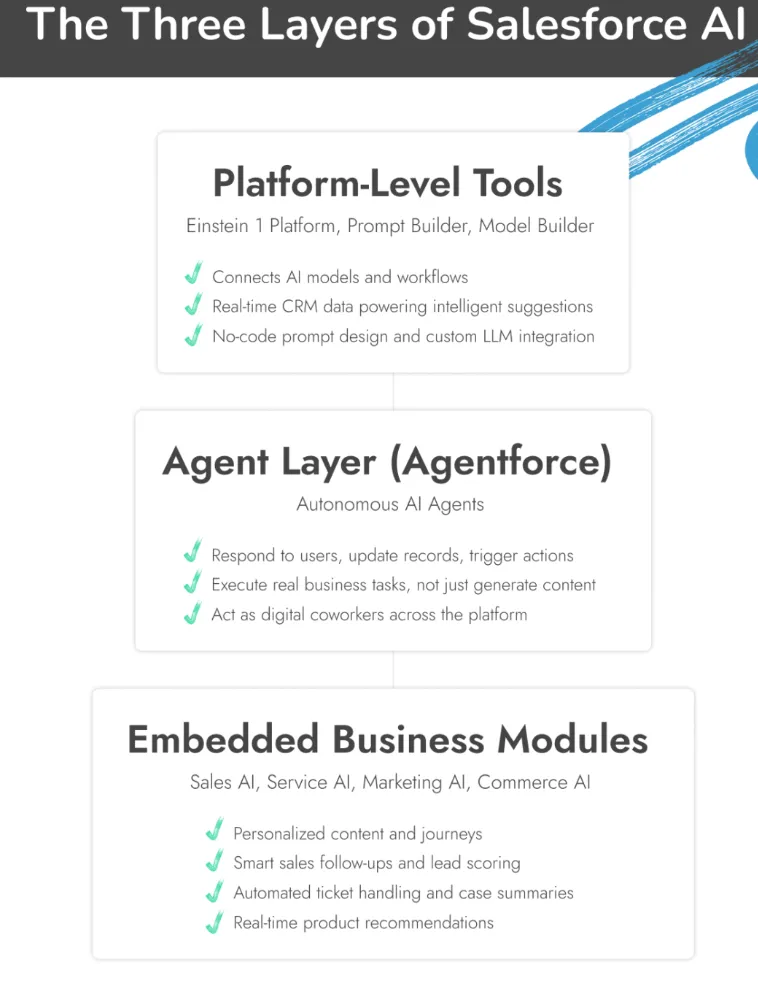
Salesforce AI isn’t one big switch you flip. It’s a mix of parts, each doing its own thing. One pulls data. Another makes the call on what to do. The rest carry it out. No one has to hover over it.
- Platform-Level Tools: This is the base. The Einstein 1 Platform, Prompt Builder, and Model Builder handle the heavy lifting of connecting data, shaping AI behavior, and making predictions.
- Agent Layer: Agentforce runs here. This is where the AI stops hinting and actually works. It can follow up on leads, close out service cases, or deal with HR requests. All of it happens inside Salesforce.
- Embedded Business Modules: Sales AI, Service AI, Marketing AI, Commerce AI. They sit inside the tools your team already uses, so you don’t have to jump to another screen to find them.
Platform-Level Tools (and Einstein 1)
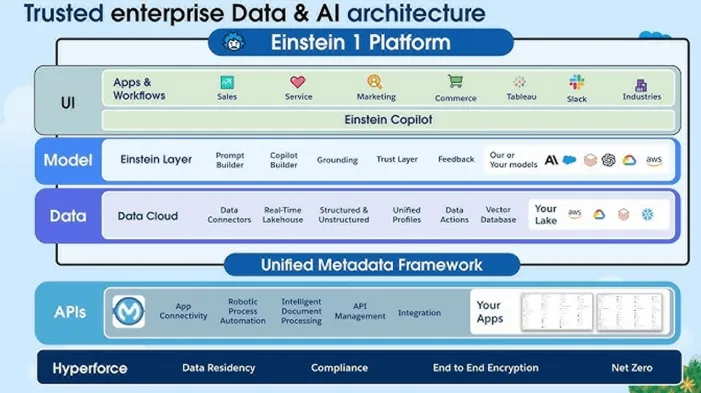
The platform layer is the foundation that everything else in Salesforce AI sits on. It’s where the data comes together, gets cleaned up, and gets matched with the right models. Without it, you’d have disconnected tools that don’t speak the same language.
Right at the core is Einstein 1, the control room. It pulls in information from across your CRM and from any outside systems you connect, then makes sure it’s all in the same, reliable format. That way, the AI isn’t working off old contact details or mismatched product records.
Then there’s Prompt Builder. This is a great tool for marketers, service leads, or admins who want the AI to work in a specific way without writing code. You can create prompts that change automatically depending on what’s in the record: things like customer location, purchase history, or account type.
Model Builder is for the heavier hitters. If you’ve already got a preferred large language model, or one you’ve built yourself, this is where you plug it in. You set the rules, you control its behavior, and it runs inside Salesforce without having to rework your existing processes.
Put these tools together and you’ve got an AI setup that adapts to the way your teams actually work. Marketing sees suggestions that make sense for their campaigns, service gets reply recommendations that fit the tone of the ticket, and sales sees follow-up actions that match the stage of the deal.
The Agent Layer: Agentforce
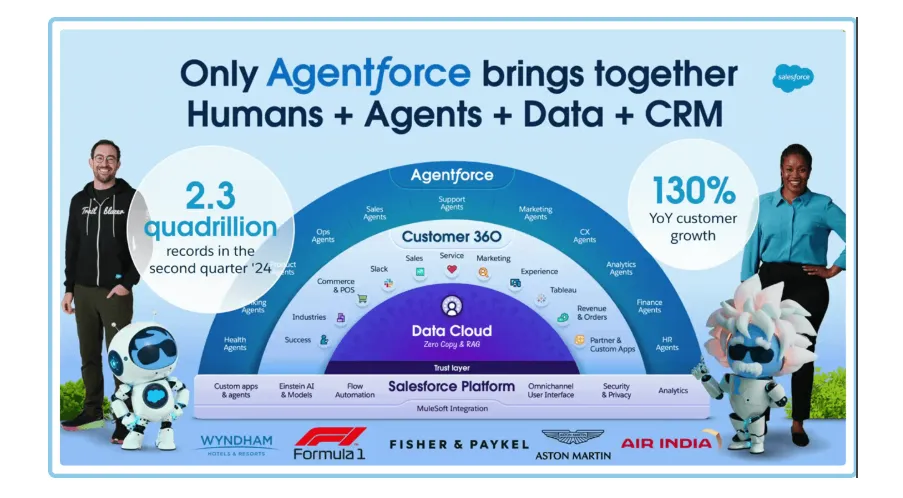
Agentforce is the framework that empowers AI to take action. These agents aren’t just there to chat with customers. They can look up account details, trigger a workflow, update records, and even decide when it’s time to hand a case over to a real person. They live inside Salesforce, so they’re pulling from the same data your teams already trust.
Under the hood, they run on Large Action Models that are built to make decisions in the moment. There’s also something called TACO - short for Thought-Action Compiler - which helps the agents break big problems into smaller steps and handle them one by one. The Atlas Reasoning Engine keeps them thinking logically, using live data to guide each move.
Security is baked in. With the Einstein Trust Layer and SFR-Guard, you can set limits, monitor every action, and make sure they’re staying inside compliance rules.
You don’t have to start from scratch either. Salesforce already has ready-to-go agents you can tweak to fit your needs:
- SDR Agent to qualify leads, follow up, and schedule meetings.
- Service Agent to handle the repetitive support stuff across chat, email, and voice.
- Internal Copilot to help HR, IT, or finance answer employee questions and guide them through internal processes.
When these agents are in place, the constant admin work disappears, and teams get back hours every week for the work that actually matters. Plus, Agentforce is continuing to evolve – new upgrades just rolled out for teams with the new Agentforce 3.0 release.
Embedded Business Modules
Salesforce didn’t build its AI to sit in a separate dashboard you barely touch. It’s wired straight into the tools your teams already use every day, so the benefits show up without anyone having to think about “using AI.” For instance:
Sales AI
Most sales reps didn’t sign up to spend their best hours logging calls or sorting leads. Yet, that’s where a lot of time disappears. Salesforce’s Sales AI is like having a teammate who quietly clears the path so reps can focus on conversations that matter.
It scores leads based on how ready they are to buy, then flags the ones worth chasing. Before a meeting, it pulls together a digest of recent activity: last emails, open cases, and past purchases, so you walk in prepared. After the meeting, it can draft a follow-up using CRM data and the call notes, ready for a quick edit.
Pair it with an SDR Agent in Agentforce, and you’ve got a setup that can research prospects, send outreach, and even book meetings before a salesperson steps in. It’s the kind of support that keeps pipelines full without burning people out.
Service AI
Customer service teams are always stretched. People expect quick answers, but not at the cost of accuracy. That’s where Service AI tools become so valuable.
When a case comes in, the AI system reads the request, catches the tone, and lines up a reply. If it’s something routine, like a password reset, it can take care of it completely and close the ticket. More complicated issues get sent to the right person, along with all the notes they need.
Some companies are already letting Agentforce Service Agents handle a big chunk of their inbound traffic. OpenTable uses them to manage thousands of chats, calls, and WhatsApp messages every week. The AI clears the repetitive stuff, so their team spends more time on the conversations that matter.
Marketing AI
Marketing’s awkward. You need the right people, at the right time, hearing the right thing. Salesforce’s Marketing AI helps you keep all that lined up.
It watches how people interact with your content and updates segments in real time. If someone starts showing signs, they’re ready to buy, they’re moved into the right list without you lifting a finger.
It can also suggest subject lines, tweak a call-to-action, or help draft copy based on what’s worked before. Campaign Agents in Agentforce take it a step further by checking performance mid-run. If an ad is wasting budget, it gets paused. If something’s working better than expected, they push more toward it.
Commerce AI
Selling online isn’t about flooding people with choices. It’s about showing the right thing at the right moment. Commerce AI is built for that.
It notices what someone does, where they click, what they read, how long they stay. Then it changes things. Suggestions shift on the spot. Prices can too if stock runs low or demand jumps.
With Einstein Commerce AI, these changes happen behind the scenes. Shoppers just feel like the site “gets” them. Add Agentforce, and you can drop in a virtual sales assistant. It can answer quick product questions, guide people to the right size or style, and keep them moving toward checkout.
The result is fewer abandoned carts and more sales without forcing customers through gimmicks. Just a smoother, more natural buying experience.
AI for Developers
Prebuilt AI tools are fine until you hit a problem they weren’t designed for. That’s when the developer toolkit comes in.
Salesforce lets teams create and run their own AI models inside its platform. You decide what the agent should do, how it should behave, and where it fits in your workflow.
Developers can have AI generate bits of code, suggest fixes, or automate checks before anything goes live. It can run custom tasks that connect with your own systems, not just Salesforce defaults.
Because it’s all inside Salesforce’s environment, you keep your data safe and your compliance intact. There’s no need for messy workarounds, or risky exports.
The Future of Salesforce AI
Salesforce is proving itself as a real leader in the AI landscape.
A couple of years ago, the big push was about generating content, things like personalized emails or quick knowledge articles. Useful, yes, but limited. Now the focus is on action. Tools like Agentforce take what AI knows and put it to work.
These agents can qualify a lead, follow up with a prospect, log the interaction, and alert a manager, all without a human clicking through screens. In service, they can triage tickets, answer routine questions, and pass only the tricky ones to a person.
At Dreamforce 2024, Salesforce said more than 3,000 customers were already running Agentforce in live environments. That number’s climbing fast.
The aim isn’t just to automate small tasks. It’s to give teams their time back. Sales reps can focus on deals. Support agents can focus on complex issues. Ops teams can focus on scaling instead of firefighting.