Chat Instantly with Your Contacts on ezTalks app for Mac
ezTalks has released a new version for Mac,which has added a new feature called Instant Messaging. This feature is available on all ezTalks apps now.
Part 1 What Is Instant Messaging?
The definition of instant messages,or IMs,are any form of real-time text based communications sent from one person in a network (public or private) to any one or more people who share that network. The message will arrive instantaneously on the recipient’s specific medium of communication (this can be a phone,smartphone,computer/laptop,or tablet).
Part 2 How to Chat Instantly with your Contacts?
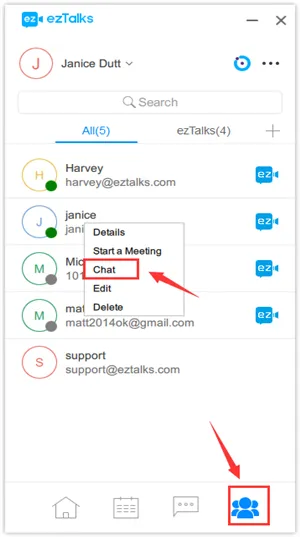
It is very easy to send instant chat on ezTalks Mac app. First of all,go to theContactspage,right click on your contact,and chooseChat:
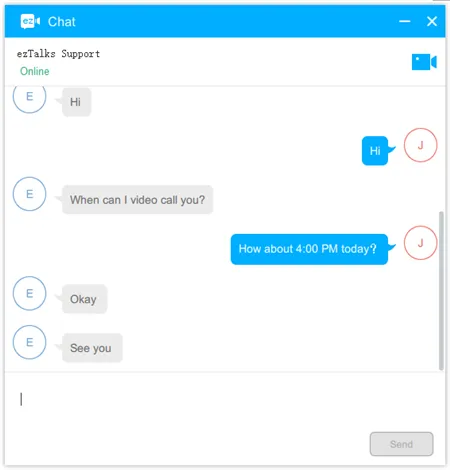
Then you can send messages to your contact. They can see the messages once they log in the ezTalks app on any device.
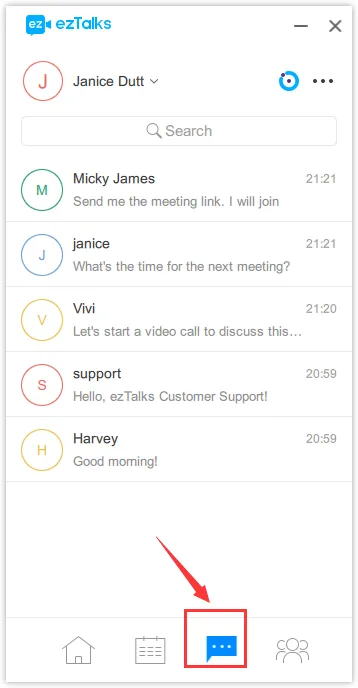
All the chats from will be shown on theMessagespage as below.
Download theapp for Macand enjoy the new feature now!